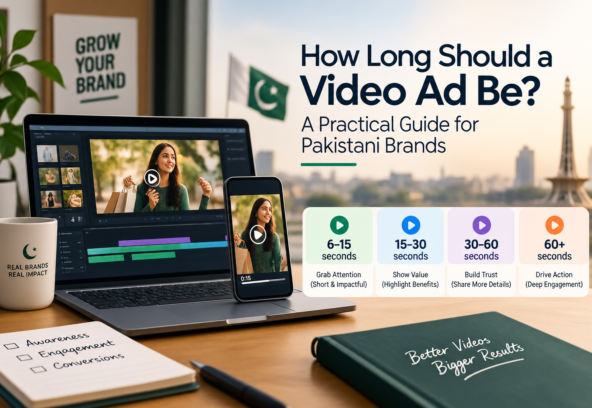

For most social media ads, 15 to 30 seconds is the safest length to start with. Short platforms like TikTok and Instagram Reels usually work best at 9 to 15 seconds. YouTube ads and retargeting videos can run longer, sometimes past a minute, if the product needs more explaining.
But there is no single “correct” number for every business. A discount code needs 10 seconds. A product demo might need 45. A customer story on YouTube might need two minutes.
The real question is not “how short can I make this?” It is simpler:
Is the video long enough to explain the offer, and short enough that people do not leave before you make it?
That one question decides everything else in this guide.
Does Video Length Actually Matter?
Yes, but length alone does not decide if an ad works.
A 10-second ad can fail because the first frame is boring. A 45-second ad can beat it because every second earns the next one. What predicts success is watch-through rate, not the number on the timer.
If viewers drop off at second five, cutting a 30-second ad to 15 seconds will not fix that. The real problem is usually one of these:
- A slow opening
- A message that is not clear
- Pacing that drags
- An offer that does not matter to the viewer
A working ai video ads does four things, in order: it grabs attention in two to three seconds, says one clear thing, shows why that thing matters, and tells the viewer exactly what to do next. Length is a result of good creativity, not the starting point.
Best Video Ad Length by Type
These ranges are a solid starting point for how each ad format is watched in 2026.
| Ad Type | Typical Length | Best For |
| Quick awareness ad | 6–15 sec | Brand recognition |
| Social feed / Reels ad | 15–30 sec | Leads, traffic, sales |
| Product demo | 30–60 sec | Showing how it works |
| Testimonial | 30–90 sec | Building trust |
| Retargeting ad | 10–30 sec | Reminding warm leads |
| YouTube skippable ad | 15–30 sec (up to 3 min) | Storytelling, education |
Treat this table as a starting point, not a rulebook. The right length is the shortest version that still says everything the viewer needs before acting. If someone genuinely needs to see your product working before they trust it, cutting the demo short to hit a shorter runtime usually costs more sales than it saves in attention.
Video Length by Platform
Every platform trains its users to watch differently, and Pakistani audiences behave a little differently too — Facebook still carries huge reach here, Instagram and TikTok dominate attention among younger users, and YouTube stays strong for longer, research-heavy content. Match the habit, do not fight it.
Facebook: Meta has pushed most Facebook video into the Reels format, so fast, vertical, feed-native content performs best. A 6 to 15 second ad is the safest default for awareness. For conversion campaigns that need to build a case, 20 to 30 seconds gives enough room. Never open with a logo or “Welcome to [company].” Open with a problem the viewer already recognises, a surprising number, or a question that stops the scroll.
Instagram: Instagram is mobile, visual, and fast. Reels ads perform best at 15 to 30 seconds, and watch-through drops noticeably past that mark. Use a strong first-frame visual instead of a slow fade-in, add captions since most people watch on mute, and keep the footage native-feeling rather than overly polished.
YouTube: This platform is really several formats in one. Bumper ads run a fixed 6 seconds and should carry one idea only. Skippable in-stream ads live or die on the first 5 seconds, since that decides whether anyone sees the rest. YouTube Shorts ads behave closest to TikTok, in the 15 to 35 second range.
TikTok: TikTok rewards ads that feel like content, not commercials. Native-style videos between 9 and 15 seconds usually hold attention best, especially when the hook lands in the first second.
The format sets the opportunity. The message decides the length.
Video Length by Campaign Goal
Your goal should shape the runtime more than any general benchmark does.
Brand awareness: Keep it short, 6 to 15 seconds. You are not explaining the whole business, just planting one memorable idea. Structure: Brand → Benefit → Memorable visual.
Lead generation: Usually needs 15 to 30 seconds to name a problem, introduce the fix, state the benefit, and ask for action. If a 40-second version answers the exact objection stopping people from converting, do not force it down to match a benchmark.
Product sales: Works best when it shows rather than tells, typically 15 to 45 seconds. Show the product in use, demonstrate the result, handle one common objection, and close with a clear call to action.
Retargeting: Audiences here already know your brand, so skip the introduction. 10 to 30 seconds is usually enough to remind them, answer a hesitation, and present the offer again.
Short vs. Long: Which Wins?
Shorter ads are easier to sit through and suit a simple message: hook, benefit, call to action. But shorter is not automatically better.
Longer ads earn their length when the product genuinely needs more explaining — demos, testimonials, case studies, or anything with real objections to overcome. A 60-second ad that clearly walks through the problem, the fix, and the proof often out-converts a rushed 15-second version of the same offer.
The better question is not “is this too long?” It is: “Is every second helping the viewer decide?” If a section is not doing that, cut it, no matter how much you like it.
What Actually Makes a Video Ad Work
Length only matters alongside strong creativity.
- Start with a hook. Skip “Welcome to our company.” Try a line connected to something your audience already worries about.
- Say one thing clearly. Pick one problem, one atom solution, one benefit. Covering the whole business in one ad usually means none of it lands.
- Show the benefit, not the feature. “Our software sends reminders” is a feature. “Stop losing appointments because people forgot” is a benefit.
- Add real proof. A testimonial, a before-and-after, or a genuine number. Never invent proof; it tends to show, and it costs more trust than it earns.
- End with one clear next step. Book a call, shop now, or send a message. One call to action beats five options.
How to Choose the Right Length
Ask these before locking in a runtime:
- Who is watching?
A cold audience needs more context. Someone who already visited your site needs almost none.
- What is the goal?
Awareness, leads, sales, and retargeting each need different amounts of information.
- How complex is the offer?
A flat discount can be said in five seconds. A service with real steps usually cannot.
- What does the viewer need to know before acting?
What might they doubt? What proof would settle it? Put that in the video and cut everything else.
Tips for Shorter Video Ads
If your ad is running long, do not just speed up every scene — that makes it feel rushed. Cut what is not earning its place: drop the introduction, remove anything already said once, focus on one benefit instead of three, replace long explanations with a visual, add captions for key points, and keep the call to action short.
A single 60-second master edit can become three purposeful versions instead of one shorter cut of the same thing:
- 15 seconds: Hook + benefit + call to action
- 30 seconds: Hook + problem + solution + proof + call to action
- 60 seconds: Hook + problem + demo + proof + objection + call to action
Test, Don’t Guess
You cannot always know the right length before a campaign runs. Build a few versions around one core message, keep every other variable the same, and watch watch-through rate, click-through rate, conversion rate, and cost per result.
Pay attention to where people stop watching, and not just when. If viewers drop off at 12 seconds, that does not automatically mean the ad should be 12 seconds long. Check what is happening at that mark — a repeated message, a flat visual, an unrelated tangent, or a call to action that showed up too early. The data usually points to a fix, not just a cut.
Final Thoughts
For most social ads, 15 to 30 seconds is still a solid place to start, but it is a starting point, not a rule. A 6-second ad can work when one idea is all the moment calls for. A 60-second ad can work when the offer genuinely needs a demo or proof before someone will act on it.
Start with the message, not the stopwatch. Build the shortest version that says everything it needs to, then test, watch the data, and let real viewers tell you where the line actually is.
FAQs
How long should a video ad be for social media?
Most social ads perform best between 15 and 30 seconds, though the right length still depends on the platform, the goal, and how familiar the audience already is with your brand.
How long should a Facebook video ad be?
6 to 15 seconds works well for awareness campaigns. 20 to 30 seconds suits conversion campaigns that need to build a short case before the call to action.
How long should an Instagram video ad be?
15 to 30 seconds is the sweet spot for Reels ads. Engagement drops noticeably past the 30-second mark.
How long should a YouTube video ad be?
It depends on the format. Bumper ads run a fixed 6 seconds. Skippable ads can run much longer, but the first 5 seconds decide whether anyone keeps watching.
Does video ad length affect performance?
Yes, but it is one factor among several. The hook, the message, the pacing, and the call to action all affect performance as much as runtime does. Testing different lengths against your own audience is the only way to know for certain what works.